API Automation for Link Management: Stop Creating 500 Links Manually
You need to create 500 product links. Manually creating each one takes 2 minutes. That's 16 hours of mind-numbing work. Or 5 minutes with an API. Learn how to automate link creation, updates, and analytics at scale.
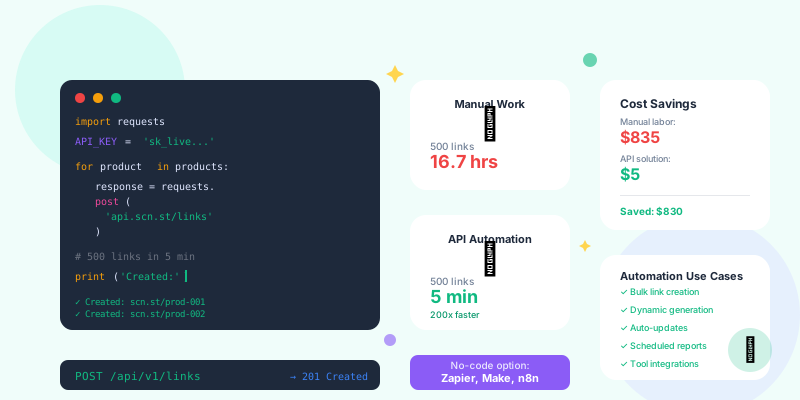
If you're still manually creating links, manually updating destinations, and manually pulling analytics one link at a time, you're wasting dozens of hours per month on tasks that should take seconds.
Link management APIs let you create, update, delete, and analyze thousands of links with a few lines of code. What takes 16 hours manually takes 5 minutes with automation.
Why Automate Link Management?
The ROI of API Automation
Manual link creation (500 product links):
Time per link: 2 minutes
• Navigate to dashboard (15 sec)
• Click "Create Link" (5 sec)
• Paste destination URL (10 sec)
• Create custom slug (20 sec)
• Add tags (15 sec)
• Set campaign (10 sec)
• Generate QR code (15 sec)
• Download/save (10 sec)
• Move to next product (20 sec)

Total: 500 links × 2 minutes = 1,000 minutes = 16.7 hours

Cost: 16.7 hours × $50/hour = $835
Error rate: ~5% (typos, wrong URLs, missed tags)
Scalability: Terrible (can't do 5,000 links)
import requests
import csv

# Read products from CSV
with open('products.csv') as f:
    products = csv.DictReader(f)

    for product in products:
        # Create short link via API
        response = requests.post('https://api.yourlink.com/links', json={
            'destination': product['url'],
            'slug': product['sku'],
            'tags': ['products', product['category']],
            'campaign': 'product-launch-2026'
        }, headers={'Authorization': 'Bearer YOUR_API_KEY'})

        print(f"Created: {response.json()['short_url']}")

# Time: 5 minutes to write script, 2 minutes to run
# Cost: $5 (7 minutes of developer time)
# Error rate: 0% (consistent, validated)
# Scalability: Perfect (works for 5,000 or 50,000 links)
Common Link Management API Use Cases
1. Bulk Link Creation
Scenario: E-commerce site with 1,000 products, each needs a trackable link. Manual approach: Create 1,000 links one at a time (33 hours) API approach:
import requests
import pandas as pd

# Load products from spreadsheet
products = pd.read_csv('products.csv')

# API credentials
API_KEY = 'your_api_key'
API_URL = 'https://api.linkshortener.com/v1/links'

# Create links for all products
for index, product in products.iterrows():
    payload = {
        'destination': product['product_url'],
        'slug': f"shop-{product['sku']}",
        'title': product['product_name'],
        'tags': ['ecommerce', product['category']],
        'campaign': 'product-catalog-2026'
    }

    response = requests.post(
        API_URL,
        json=payload,
        headers={'Authorization': f'Bearer {API_KEY}'}
    )

    if response.status_code == 200:
        short_url = response.json()['short_url']
        products.at[index, 'short_url'] = short_url
    else:
        print(f"Error creating link for {product['sku']}: {response.text}")

# Save updated spreadsheet with short URLs
products.to_csv('products_with_links.csv', index=False)
print(f"Created {len(products)} links in bulk")
2. Dynamic Link Generation
Scenario: Generate personalized links for each email recipient (10,000 subscribers). Manual approach: Impossible (can't create 10,000 unique links manually) API approach:
import requests
import hashlib

def generate_personalized_link(user_email, destination, campaign):
    """Generate unique link for each user"""

    # Create unique identifier from email
    user_hash = hashlib.md5(user_email.encode()).hexdigest()[:8]

    # Create link via API
    response = requests.post('https://api.linkshortener.com/v1/links', json={
        'destination': f"{destination}?user={user_hash}",
        'slug': f"{campaign}-{user_hash}",
        'tags': ['email', campaign],
        'metadata': {'user_email': user_email}  # Store for later analysis
    }, headers={'Authorization': f'Bearer {API_KEY}'})

    return response.json()['short_url']

# Generate personalized links for all subscribers
subscribers = get_email_list()  # From your email platform

for subscriber in subscribers:
    personalized_link = generate_personalized_link(
        subscriber['email'],
        'https://yoursite.com/offer',
        'january-promo'
    )

    # Send email with personalized link
    send_email(subscriber['email'], personalized_link)

print(f"Sent {len(subscribers)} personalized emails")
3. Automated Link Updates
Scenario: Running A/B test, need to switch destination URL for 200 links mid-campaign. Manual approach: Update 200 links one at a time (6 hours) API approach:
import requests

# Get all links in campaign
response = requests.get(
    'https://api.linkshortener.com/v1/links',
    params={'campaign': 'summer-sale', 'tags': 'variant-a'},
    headers={'Authorization': f'Bearer {API_KEY}'}
)

variant_a_links = response.json()['links']

# Update all variant A links to variant B destination
new_destination = 'https://yoursite.com/summer-sale-variant-b'

for link in variant_a_links:
    update_response = requests.patch(
        f'https://api.linkshortener.com/v1/links/{link["id"]}',
        json={
            'destination': new_destination,
            'tags': ['summer-sale', 'variant-b']  # Update tags too
        },
        headers={'Authorization': f'Bearer {API_KEY}'}
    )

    if update_response.status_code == 200:
        print(f"Updated {link['slug']} to variant B")

print(f"Updated {len(variant_a_links)} links in 30 seconds")
4. Automated Analytics Reporting
Scenario: Weekly report showing performance of all campaign links. Manual approach: Export data from dashboard, copy to Excel, format, send (2 hours/week) API approach:
import requests
import pandas as pd
from datetime import datetime, timedelta

def generate_weekly_report(campaign_name):
    """Pull analytics for all links in campaign"""

    # Get all links in campaign
    links_response = requests.get(
        'https://api.linkshortener.com/v1/links',
        params={'campaign': campaign_name},
        headers={'Authorization': f'Bearer {API_KEY}'}
    )

    links = links_response.json()['links']

    # Get analytics for each link (last 7 days)
    report_data = []

    for link in links:
        analytics_response = requests.get(
            f'https://api.linkshortener.com/v1/links/{link["id"]}/analytics',
            params={
                'start_date': (datetime.now() - timedelta(days=7)).isoformat(),
                'end_date': datetime.now().isoformat()
            },
            headers={'Authorization': f'Bearer {API_KEY}'}
        )

        analytics = analytics_response.json()

        report_data.append({
            'Link': link['short_url'],
            'Destination': link['destination'],
            'Clicks': analytics['total_clicks'],
            'Unique Visitors': analytics['unique_visitors'],
            'Conversions': analytics['conversions'],
            'Conversion Rate': f"{analytics['conversion_rate']:.1%}"
        })

    # Create DataFrame and export
    df = pd.DataFrame(report_data)
    df = df.sort_values('Clicks', ascending=False)

    # Save to Excel
    filename = f"campaign_report_{campaign_name}_{datetime.now().strftime('%Y%m%d')}.xlsx"
    df.to_excel(filename, index=False)

    # Send email with report
    send_email_with_attachment('team@company.com', 'Weekly Campaign Report', filename)

    return df

# Run weekly (schedule with cron or task scheduler)
generate_weekly_report('summer-sale-2026')
5. Integration with Other Tools
Scenario: Automatically create short link when new product is added to Shopify. Integration: Shopify + Link Management API
from flask import Flask, request
import requests

app = Flask(__name__)

@app.route('/shopify-webhook', methods=['POST'])
def handle_new_product():
    """Triggered when new product is created in Shopify"""

    product_data = request.json

    # Create short link for new product
    link_response = requests.post(
        'https://api.linkshortener.com/v1/links',
        json={
            'destination': product_data['product_url'],
            'slug': f"shop-{product_data['sku']}",
            'title': product_data['title'],
            'tags': ['shopify', 'products', product_data['product_type']],
            'campaign': 'product-catalog'
        },
        headers={'Authorization': f'Bearer {API_KEY}'}
    )

    short_url = link_response.json()['short_url']

    # Update product in Shopify with short URL in description
    update_shopify_product(product_data['id'], short_url)

    print(f"Created short link for new product: {short_url}")

    return {'status': 'success'}

if __name__ == '__main__':
    app.run()
API Best Practices
1. Use Environment Variables for API Keys
Bad (hardcoded key):
API_KEY = 'sk_live_abc123xyz789' # Never do this!
import os

API_KEY = os.getenv('LINK_API_KEY')

if not API_KEY:
    raise Exception('LINK_API_KEY environment variable not set')
2. Handle Rate Limits
Problem: APIs limit requests per minute (e.g., 100 requests/minute). Solution: Add rate limiting to your code
import time
import requests

def create_link_with_retry(payload, max_retries=3):
    """Create link with automatic retry on rate limit"""

    for attempt in range(max_retries):
        response = requests.post(
            'https://api.linkshortener.com/v1/links',
            json=payload,
            headers={'Authorization': f'Bearer {API_KEY}'}
        )

        if response.status_code == 200:
            return response.json()

        elif response.status_code == 429:  # Rate limited
            retry_after = int(response.headers.get('Retry-After', 60))
            print(f"Rate limited. Waiting {retry_after} seconds...")
            time.sleep(retry_after)

        else:
            print(f"Error: {response.status_code} - {response.text}")
            return None

    raise Exception('Max retries exceeded')

# Use this instead of direct API call
result = create_link_with_retry({'destination': 'https://example.com', 'slug': 'test'})
3. Batch Operations Where Possible
Inefficient (1,000 separate API calls):
for product in products:
    create_link(product)  # 1,000 requests = slow
# Create 1,000 links in single request
response = requests.post(
    'https://api.linkshortener.com/v1/links/batch',
    json={'links': [
        {'destination': p['url'], 'slug': p['sku']}
        for p in products
    ]},
    headers={'Authorization': f'Bearer {API_KEY}'}
)

created_links = response.json()['links']
4. Validate Input Before API Calls
Problem: Invalid data wastes API calls and quota. Solution: Validate first
import re

def validate_destination_url(url):
    """Validate URL before creating link"""

    # Check if URL is valid format
    url_pattern = re.compile(
        r'^https?://'  # http:// or https://
        r'(?:(?:[A-Z0-9](?:[A-Z0-9-]{0,61}[A-Z0-9])?.)+[A-Z]{2,6}.?|'  # domain
        r'localhost|'  # localhost
        r'd{1,3}.d{1,3}.d{1,3}.d{1,3})'  # or IP
        r'(?::d+)?'  # optional port
        r'(?:/?|[/?]S+)$', re.IGNORECASE)

    return bool(url_pattern.match(url))

# Validate before creating link
if validate_destination_url(destination):
    create_link(destination)
else:
    print(f"Invalid URL: {destination}")
- Not checking response status: Always check if request succeeded
- Ignoring errors: Handle errors gracefully (retry, skip, alert)
- No logging: Log all API calls for debugging
- Synchronous loops: Use async/concurrent requests for speed
- No timeout: Set request timeout (requests hang forever otherwise)
5. Cache Responses When Appropriate
Problem: Fetching same data repeatedly wastes API quota. Solution: Cache responses
import requests
from functools import lru_cache
from datetime import datetime, timedelta

@lru_cache(maxsize=100)
def get_link_analytics(link_id, date):
    """Cache analytics for same day (don't re-fetch)"""

    response = requests.get(
        f'https://api.linkshortener.com/v1/links/{link_id}/analytics',
        params={'date': date},
        headers={'Authorization': f'Bearer {API_KEY}'}
    )

    return response.json()

# First call: Fetches from API
analytics = get_link_analytics('abc123', '2026-01-05')

# Second call: Returns cached result (no API call)
analytics = get_link_analytics('abc123', '2026-01-05')
No-Code API Automation
"But I really can't code..."No problem. These tools let you use APIs without writing code:
Zapier (Easiest)
Example: Auto-create link when Google Sheet row is added
Trigger: New row in Google Sheet
Action: Create short link (via API)
Action: Update sheet with short URL

Setup time: 5 minutes
Code required: Zero
Make (formerly Integromat)
Example: Create link when Airtable record is created
Trigger: New Airtable record (products table)
HTTP Module: POST to link API
Airtable Module: Update record with short URL

Setup time: 10 minutes
Code required: Zero (visual interface)
n8n (Free, Self-Hosted)
Example: Bulk create links from CSV
Trigger: Manual trigger
CSV Module: Read products.csv
Loop: For each row
HTTP Module: Create link via API
CSV Module: Export results

Setup time: 15 minutes
Cost: Free (self-hosted)
Advanced API Patterns
1. Webhook-Driven Automation
Receive real-time notifications when link is clicked:
from flask import Flask, request
import requests

app = Flask(__name__)

@app.route('/webhook/link-clicked', methods=['POST'])
def handle_link_click():
    """Triggered every time a tracked link is clicked"""

    click_data = request.json

    # Example: Send Slack notification for high-value links
    if click_data['link_slug'] == 'vip-offer':
        send_slack_message(
            f"🎯 VIP link clicked by {click_data['country']} visitor!"
        )

    # Example: Trigger email sequence
    if click_data['campaign'] == 'trial-signup':
        trigger_email_sequence(click_data['user_id'])

    return {'status': 'received'}
2. Scheduled Jobs (Cron)
Run automation daily/weekly automatically:
# crontab -e (Linux/Mac cron scheduler)

# Daily at 9 AM: Create links for new blog posts
0 9 * * * python /scripts/create_blog_links.py

# Weekly Monday 8 AM: Generate analytics report
0 8 * * 1 python /scripts/weekly_report.py

# Hourly: Check for expired links and alert
0 * * * * python /scripts/check_expired_links.py
3. Error Handling & Monitoring
Production-ready error handling:
import requests
import logging
from datetime import datetime

# Set up logging
logging.basicConfig(
    filename=f'link_automation_{datetime.now().strftime("%Y%m%d")}.log',
    level=logging.INFO
)

def create_link_production(destination, slug):
    """Production-grade link creation with error handling"""

    try:
        response = requests.post(
            'https://api.linkshortener.com/v1/links',
            json={'destination': destination, 'slug': slug},
            headers={'Authorization': f'Bearer {API_KEY}'},
            timeout=10  # 10 second timeout
        )

        response.raise_for_status()  # Raise exception for 4xx/5xx

        result = response.json()
        logging.info(f"✓ Created link: {slug} → {result['short_url']}")
        return result

    except requests.exceptions.Timeout:
        logging.error(f"✗ Timeout creating link: {slug}")
        send_alert('API timeout', f'Failed to create {slug}')
        return None

    except requests.exceptions.HTTPError as e:
        logging.error(f"✗ HTTP error creating link: {slug} - {e}")
        send_alert('API error', f'HTTP {e.response.status_code} for {slug}')
        return None

    except Exception as e:
        logging.error(f"✗ Unexpected error creating link: {slug} - {e}")
        send_alert('Unexpected error', str(e))
        return None
Real-World Automation Examples
E-commerce: Automated Product Links
Problem: 500 new products added monthly, each needs trackable link. Solution:
# Runs daily, creates links for new products
import shopify
import requests

# Get products added in last 24 hours
new_products = shopify.Product.find(created_at_min=yesterday)

for product in new_products:
    # Create short link
    link_response = create_link(
        destination=product.url,
        slug=f"shop-{product.sku}",
        tags=['products', product.product_type],
        campaign='product-catalog'
    )

    # Add short link to product description
    product.description += f"

Share: {link_response['short_url']}"
    product.save()

print(f"Processed {len(new_products)} new products")
Content Marketing: Blog Post Links
Problem: Publish 20 blog posts/month, each needs multiple short links (social, email, ads). Solution:
# Triggered when new blog post is published
def create_blog_post_links(blog_post):
    """Create all necessary links for blog post"""

    post_slug = blog_post['slug']
    post_url = f"https://blog.com/{post_slug}"

    # Create links for different channels
    links = {
        'social': create_link(
            destination=f"{post_url}?utm_source=social",
            slug=f"blog-{post_slug}",
            tags=['blog', 'social'],
            campaign=blog_post['category']
        ),
        'email': create_link(
            destination=f"{post_url}?utm_source=email",
            slug=f"blog-{post_slug}-email",
            tags=['blog', 'email'],
            campaign=blog_post['category']
        ),
        'ads': create_link(
            destination=f"{post_url}?utm_source=ads",
            slug=f"blog-{post_slug}-ad",
            tags=['blog', 'paid'],
            campaign=blog_post['category']
        )
    }

    # Save links to CMS for easy access
    update_cms(blog_post['id'], links)

    return links
Conclusion
If you're creating more than 10 links per week, you should be using API automation.Manual link creation is like digging holes with a spoon when you have access to a shovel. It works, but it's painfully slow and unnecessarily tedious.
API automation isn't just for developers. With no-code tools (Zapier, Make) or simple Python scripts, anyone can automate link management in minutes.
Your action plan: This week:- Get API credentials from your link management platform
- Identify your most repetitive link management task
- Choose automation method (code vs. no-code tool)
- Automate bulk link creation for your most common use case
- Set up weekly analytics report automation
- Integrate with one other tool (Shopify, WordPress, Google Sheets)
- Automate 80% of repetitive link management tasks
- Set up webhook-driven workflows (auto-create links on triggers)
- Measure time saved (should be 10+ hours/month)
Stop spending 16 hours creating 500 links manually. Spend 5 minutes writing a script that does it for you.
Your time is worth more than copying and pasting URLs.