Attribution Modeling: Stop Giving Facebook Credit for Sales Google Actually Drove
Facebook says it drove 500 conversions. Google says 300. Email says 200. You only had 400 sales. Someone is lying. Learn how attribution modeling reveals who actually deserves credit for your conversions.
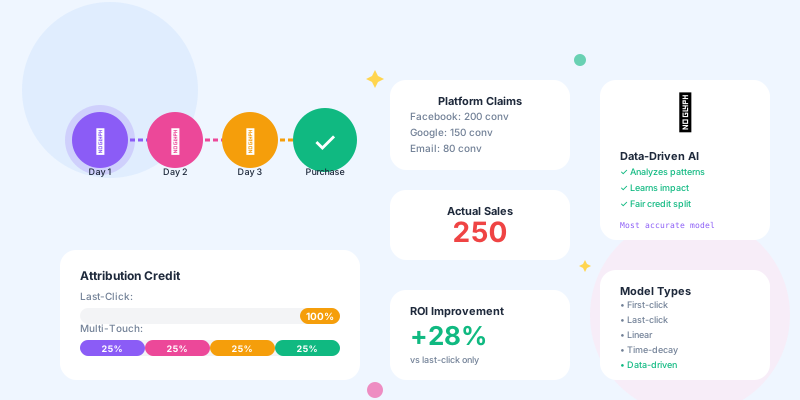
Every marketing platform wants to take credit for every conversion. Facebook uses last-click attribution. Google uses last non-direct click. Your email tool uses any-touch attribution. They all count the same sale multiple times.
Without proper attribution modeling, you're making budget decisions based on inflated, overlapping, double-counted metrics. You think Facebook is your best channel when really it's just the last click before checkout. Meanwhile, Google drove the actual interest three days earlier but gets zero credit.
What Is Attribution Modeling?
Simple definition: Attribution modeling decides which marketing touchpoints get credit (and how much credit) for a conversion. The problem:
Typical customer journey:
Monday: Sees Facebook ad → Clicks → Browses
Tuesday: Searches on Google → Clicks → Reads reviews
Wednesday: Gets email reminder → Clicks → Adds to cart
Thursday: Direct visit → Completes purchase

Question: Which channel drove the sale?
- Facebook (started the journey)?
- Google (drove research)?
- Email (reminded them)?
- Direct (final conversion)?

Each platform's answer:
• Facebook Ads Manager: "Facebook drove this sale" (first click)
• Google Ads: "Google drove this sale" (last paid click)
• Email platform: "Email drove this sale" (last click)
• Analytics: "Direct drove this sale" (last click)

Reality: All four contributed. But which one deserves budget?
Attribution modeling is the framework for fairly distributing conversion credit across all touchpoints in the customer journey.
Attribution Models Explained
1. Last-Click Attribution (Most Common, Most Misleading)
How it works: 100% of credit goes to the last touchpoint before conversion. Example:
Journey:
Facebook ad → Blog post → Email → Google search → Direct → Purchase

Credit:
Direct: 100%
Everything else: 0%
- Simple to implement
- Easy to understand
- Matches most analytics platforms' default
- Ignores all earlier touchpoints
- Over-values bottom-of-funnel channels (direct, branded search)
- Under-values top-of-funnel channels (display ads, content)
Imagine you're buying a car. You see a TV commercial, research online, visit the dealership three times, take a test drive, negotiate price, then finally buy. The salesperson who handed you the keys gets 100% credit. The TV commercial, the website, the three previous visits, the test drive—all get zero credit.
That's last-click attribution. It's absurd. Yet 70% of companies use it.
2. First-Click Attribution (Over-Credits Discovery)
How it works: 100% of credit goes to the first touchpoint that introduced the customer. Example:
Journey:
Facebook ad → Blog post → Email → Google search → Purchase

Credit:
Facebook: 100%
Everything else: 0%
- Values awareness and discovery
- Good for measuring top-of-funnel effectiveness
- Rewards channels that introduce new customers
- Ignores nurturing and conversion channels
- Over-values channels that generate clicks but don't convert
- Can reward low-quality traffic that requires heavy nurturing
- Measuring brand awareness campaigns
- Evaluating new customer acquisition channels
- Assessing which content brings in cold traffic
3. Linear Attribution (Everyone Gets Equal Credit)
How it works: Credit is split equally across all touchpoints. Example:
Journey:
Facebook ad → Blog post → Email → Google search → Purchase

Credit:
Each touchpoint: 25%
- Fair to all channels
- Acknowledges multi-touch journey
- Simple to calculate
- Assumes all touchpoints are equally important (they're not)
- Doesn't reflect reality (some touches matter more)
- Can over-credit irrelevant touchpoints
- Short sales cycles (all touches are close together)
- Simple products (fewer consideration touchpoints)
- When you truly don't know which touches matter most
4. Time-Decay Attribution (Recent Touches Matter More)
How it works: More recent touchpoints get more credit, older ones get less. Example:
Journey (over 7 days):
Day 1: Facebook ad → 10% credit
Day 3: Blog post → 15% credit
Day 5: Email → 25% credit
Day 7: Google search → 50% credit

Credit decreases as time passes
- Reflects that recent touches drive action
- Values bottom-of-funnel activity appropriately
- Doesn't completely ignore top-of-funnel
- Still under-credits discovery channels
- Arbitrary decay rate (7-day half-life vs 30-day?)
- Complex to explain to stakeholders
- B2C with medium sales cycles (1-4 weeks)
- Products with clear consideration → purchase timeline
- When you want to value recent activity more than old activity
5. Position-Based Attribution (U-Shaped: First and Last Get 40% Each)
How it works: First touch gets 40%, last touch gets 40%, everything in the middle shares 20%. Example:
Journey:
Facebook ad → Blog → Email → Search → Purchase

Credit:
Facebook (first): 40%
Blog: 6.67%
Email: 6.67%
Search: 6.67%
Purchase (last): 40%
- Values both discovery and conversion
- Acknowledges middle touches exist
- Balanced approach
- Arbitrary percentages (why 40/20/40?)
- Middle touches often matter more than 20% combined
- Doesn't reflect actual influence
- When first and last touches are clearly most important
- B2C with impulse purchases (discover → buy quickly)
- When you want to balance top and bottom of funnel
6. Data-Driven Attribution (Algorithmic, Most Accurate)
How it works: Machine learning analyzes conversion paths and assigns credit based on actual impact. Example:
Algorithm analyzes 10,000 conversions:
- Customers who saw Facebook ad + email convert at 12%
- Customers who saw email only convert at 3%
- Customers who saw Facebook only convert at 2%

Conclusion: Facebook contributes 2%, email contributes 3%, combination contributes extra 7%

Credit distribution:
Facebook: 30%
Email: 40%
Google: 30%
(Based on actual incremental contribution)
- Most accurate reflection of reality
- Adapts to your specific customer behavior
- Removes guesswork and bias
- Requires significant data (1,000+ conversions/month minimum)
- Complex to explain
- Can't see the algorithm logic (black box)
- Changes over time (hard to track)
- Large volume businesses (500+ conversions/month)
- Complex customer journeys (many touchpoints)
- When you have the data and trust machine learning
Why Attribution Matters: Real Budget Impacts
Scenario: $20K Monthly Ad Budget Allocation
Using Last-Click Attribution:
Channel performance (last-click):
• Google Ads (branded search): 200 conversions, $50 CPA
• Facebook Ads: 80 conversions, $125 CPA
• Display Ads: 20 conversions, $500 CPA

Budget decision based on last-click:
• Google: $12K (most conversions, lowest CPA)
• Facebook: $6K (decent conversions, okay CPA)
• Display: $2K (terrible CPA, consider cutting)
Channel performance (multi-touch):
• Google Ads (branded search): 80 primary, 120 assisted
• Facebook Ads: 120 primary, 180 assisted
• Display Ads: 100 primary, 200 assisted (introduces customers)

Insights:
• Google gets credit for conversions started by Facebook/Display
• Display ads have "terrible" last-click CPA but assist 200 sales
• Facebook drives awareness that leads to Google branded searches

Budget decision based on multi-touch:
• Display: $8K (drives most awareness and assists)
• Facebook: $7K (drives mid-funnel engagement)
• Google: $5K (captures existing demand, but doesn't create it)
- Last-click allocation: Cut display budget, increase Google
- Multi-touch allocation: Increase display budget, balance others
- Revenue impact: Multi-touch approach drives 35% more new customer acquisition (because it funds top-of-funnel)
How to Implement Multi-Touch Attribution
Step 1: Track the Full Customer Journey
Minimum tracking requirements:
For each user session, capture:
1. Traffic source (Facebook, Google, Email, Direct, etc.)
2. Campaign/ad ID (which specific campaign)
3. Landing page (where they entered)
4. Timestamp (when it happened)
5. User identifier (cookie, user ID, email hash)

For each conversion, capture:
1. User identifier (match to sessions)
2. Conversion value (revenue)
3. Conversion type (purchase, signup, demo request)
4. Timestamp

Link them:
User 12345 journey:
- Session 1: Facebook ad, Dec 1, 2:15 PM
- Session 2: Google search, Dec 3, 10:22 AM
- Session 3: Email click, Dec 5, 8:45 PM
- Session 4: Direct, Dec 6, 11:30 AM → Conversion ($150)
- Short link tracker with UTM parameters (track every link)
- Analytics platform with user ID tracking (Google Analytics 4, Mixpanel, Amplitude)
- CRM or database to store journey data (connect online + offline touchpoints)
Step 2: Choose Your Attribution Window
Attribution window = how far back to look for touchpoints Common windows:
• 1-day window: Only count touchpoints in last 24 hours
  → Use for: Impulse purchases, daily deals

• 7-day window: Count touchpoints in last 7 days
  → Use for: E-commerce, SaaS free trials, most B2C

• 30-day window: Count touchpoints in last 30 days
  → Use for: Considered purchases ($500+), B2B, subscriptions

• 90-day window: Count touchpoints in last 90 days
  → Use for: Enterprise B2B, high-value purchases ($5K+)
Step 3: Implement Your Attribution Model
Option A: Build custom attribution (advanced)
-- Example: Calculate time-decay attribution
WITH customer_journeys AS (
  SELECT
    user_id,
    conversion_id,
    touchpoint_channel,
    touchpoint_timestamp,
    conversion_timestamp,
    DATEDIFF(conversion_timestamp, touchpoint_timestamp) AS days_before_conversion
  FROM user_sessions
  WHERE conversion_id IS NOT NULL
),
attribution_weights AS (
  SELECT
    *,
    -- Time decay: each day old = 10% less credit
    POWER(0.9, days_before_conversion) AS weight
  FROM customer_journeys
),
normalized_attribution AS (
  SELECT
    *,
    weight / SUM(weight) OVER (PARTITION BY conversion_id) AS attribution_percent
  FROM attribution_weights
)
SELECT
  touchpoint_channel,
  SUM(attribution_percent) AS total_attributed_conversions
FROM normalized_attribution
GROUP BY touchpoint_channel;
- Google Analytics 4: Built-in data-driven attribution
- Facebook Attribution: Cross-platform journey tracking
- HubSpot: Multi-touch revenue attribution
- Segment + CDP: Custom attribution rules
Step 4: Analyze and Adjust Budget
Monthly attribution review process:
1. Pull attribution report for last 30 days
   → See which channels get credit under different models

2. Compare models side-by-side
   → Last-click vs. first-click vs. data-driven

3. Identify over-credited channels
   → High last-click, low multi-touch = bottom-funnel only

4. Identify under-credited channels
   → Low last-click, high multi-touch = top-funnel driver

5. Adjust budget allocation
   → Shift 10-20% toward under-credited awareness channels

6. Measure results after 30 days
   → Did new customer acquisition improve?
Common Attribution Challenges
Challenge 1: Cross-Device Tracking
The problem:
User journey:
Monday (iPhone): Sees Facebook ad → Clicks → Browses
Tuesday (work laptop): Searches Google → Clicks → Reads
Wednesday (home iPad): Opens email → Clicks → Purchases

Last-click attribution sees:
Three separate users, each with one touchpoint
→ Email gets 100% credit
→ Facebook and Google get 0% credit
- Require login (track authenticated users across devices)
- Use device fingerprinting (probabilistic matching, 70% accuracy)
- Use email hash matching (when user provides email)
- Accept limitation (optimize for single-device journeys separately)
Challenge 2: Offline Conversions
The problem:
User journey:
Monday: Sees Facebook ad, clicks, browses online
Tuesday: Calls phone number from website
Wednesday: Visits physical store, makes purchase

Online attribution: Zero conversions (purchase happened offline)
Reality: Online drove the offline sale
- Use unique phone numbers per campaign (call tracking)
- Ask in-store customers "How did you hear about us?" (manual attribution)
- Offer online coupon codes to track online → offline (code redemption tracking)
- Match email/phone from online to in-store purchase records
Challenge 3: Dark Social (Untrackable Shares)
The problem:
User shares your link in WhatsApp, Slack, text message
Recipient clicks → Shows as "Direct" traffic (no referrer)
Attribution: Incorrectly labeled as direct

Reality: It was a referral, but untrackable
- Use shortened links for all shareable content (track copies of link)
- Add "?share=1" parameter to share buttons (track share intent)
- Create share-specific links (different URL per share method)
- Monitor direct traffic spikes after campaigns (likely dark social)
Challenge 4: View-Through Attribution (Did They See the Ad?)
The problem:
User sees Facebook ad (doesn't click)
3 days later: Searches brand on Google → Clicks → Purchases

Last-click: Google gets 100% credit
Reality: Facebook ad created awareness that led to branded search
- Use platform view-through tracking (Facebook/Google provide this)
- Set 1-day view-through window (saw ad yesterday, bought today = count it)
- Use brand search lift studies (measure brand searches before/after campaign)
- Survey customers post-purchase ("How did you hear about us?")
Attribution Models by Business Type
E-commerce (Short Sales Cycle)
Recommended model: Time-decay (7-day window) Why:- Customers research quickly (1-7 days)
- Last few touches matter most
- Impulse purchases common
Touchpoint weighting:
• Day 1 (oldest): 5% credit
• Day 3: 10% credit
• Day 5: 20% credit
• Day 7 (newest): 65% credit
B2B SaaS (Medium Sales Cycle)
Recommended model: Position-based (30-day window) Why:- First touch (awareness) is critical
- Last touch (demo/trial) drives conversion
- Middle touches less impactful
Credit distribution:
• First touch: 30%
• Middle touches: 40% (split equally)
• Last touch: 30%
Enterprise B2B (Long Sales Cycle)
Recommended model: Data-driven (90-day window) Why:- Many touchpoints over months
- Complex buying committees
- Hard to predict which touches matter
- Require minimum 100 conversions/quarter
- Let algorithm determine credit based on patterns
- Review quarterly (buying patterns change)
Lead Gen (Multi-Step Funnel)
Recommended model: Custom stage-based Why:- Multiple conversion points (lead → MQL → SQL → customer)
- Each stage needs different credit
- Sales team influences final conversion
Stage 1: Became lead
→ Use first-click (what drove initial interest?)

Stage 2: Became MQL
→ Use linear (what nurtured them?)

Stage 3: Became SQL
→ Use last-click (what triggered sales readiness?)

Stage 4: Became customer
→ Use custom (sales team gets credit, marketing gets partial)
Conclusion
Attribution modeling isn't about perfect accuracy—it's about better decisions.You'll never have perfect attribution. Users clear cookies. They switch devices. They see your ad but don't click, then search your brand later. They share your link in WhatsApp with no tracking.
But "imperfect attribution" is infinitely better than "last-click attribution only." Even if your multi-touch model is only 70% accurate, it's still 70% more accurate than giving 100% credit to the last click.
Your action plan: This week:- Check what attribution model your analytics uses (probably last-click)
- Pull a report comparing last-click vs. other models
- Identify channels getting inflated credit
- Implement UTM tracking on all campaigns (track every source)
- Set up multi-touch attribution (use GA4 data-driven or custom)
- Compare budget allocation under different models
- Reallocate 10-20% of budget based on multi-touch insights
- Measure new customer acquisition rate (did it improve?)
- Educate team on why attribution modeling matters
Stop letting Facebook claim credit for sales Google drove. Start using attribution modeling to see the truth.
Your budget decisions should be based on reality, not the platform that got the last click.