Link Governance for Enterprise Teams: Manage 10,000+ Links Without Chaos
Your enterprise has 47 teams creating links independently. No naming conventions. No approval process. Broken links everywhere. Compliance nightmares. Here's how to implement link governance that scales without slowing teams down.
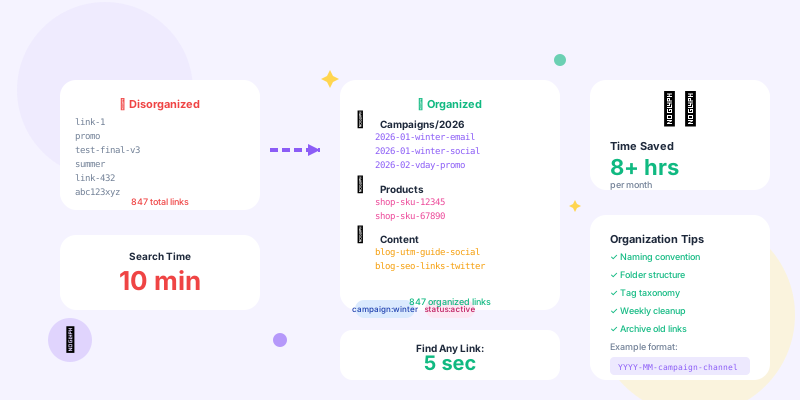
Small teams can manage links informally. Enterprises cannot. When you scale to dozens of teams, thousands of campaigns, and millions of link clicks, you need governance: naming conventions, approval workflows, permission management, compliance controls, and audit trails.
Without governance, you get chaos. With too much governance, teams can't move fast. This guide shows you how to implement enterprise link governance that scales without becoming bureaucracy.
Why Link Governance Matters
The Cost of Link Chaos
- Marketing: yoursite.co/holiday-sale
- E-commerce: yoursite.co/holiday23-sale
- Social: yoursite.co/holidaysale
What Enterprise Link Governance Solves
- Naming consistency: Standardized conventions across all teams
- Duplicate prevention: Stop teams from creating redundant links
- Compliance enforcement: Required approvals for regulated industries
- Security controls: Review links before public use
- Audit trails: Track who created what, when, why
- Link lifecycle: Archival, expiration, deprecation workflows
- Permission management: Team-based access control
- Analytics governance: Consistent tagging and attribution
Link Naming Conventions
Enterprise Slug Structure
Standardize link slugs across the organization:
[channel]-[campaign]-[content]-[variant]
Examples:
email-holiday2026-banner-v1social-product-launch-video-apaid-google-brand-protection-mobilepartner-acme-collab-exclusive
- Instantly identify link purpose
- Group related links easily
- Enable automated analysis
- Prevent duplicates
Campaign Taxonomy
Standardize campaign naming across organization:
// Campaign naming standard
{
  "format": "{year}-{quarter}-{team}-{campaign-name}",
  "examples": [
    "2026-q1-marketing-product-launch",
    "2026-q2-sales-enterprise-outreach",
    "2026-q1-regional-eu-expansion"
  ],
  "rules": {
    "year": "4-digit year (2026)",
    "quarter": "q1, q2, q3, q4, or h1, h2",
    "team": "marketing, sales, product, regional-[code]",
    "campaign-name": "lowercase, hyphens only, max 30 chars"
  }
}
Tag Standards
email, social, paid-search, organic-search, partner, affiliate, pr, direct-mail, events
2. Content Type Tags (mandatory):
blog, product, landing-page, case-study, whitepaper, video, webinar, ebook
3. Geography Tags (if applicable):
us, eu, uk, apac, global, regional-[code]
4. Business Unit Tags (if applicable):
enterprise, smb, consumer, b2b, b2c
5. Campaign Stage Tags:
awareness, consideration, conversion, retention, advocacy
Permission and Access Control
Role-Based Access
Implement granular permissions:
- Create links in assigned workspaces
- Edit own links
- View team analytics
- Cannot delete links
- Cannot access other teams' links
- All Link Creator permissions
- Edit any link in workspace
- Delete links (with approval if live)
- Manage team members
- Export team data
- All Team Manager permissions
- Create/edit workspaces
- Configure naming standards
- Set up approval workflows
- Manage custom domains
- View cross-team analytics
- All permissions
- User provisioning/deprovisioning
- Security configuration
- Audit log access
- Compliance reporting
- API key management
Workspace Organization
Organize teams into workspaces:
// Enterprise workspace structure
{
  "workspaces": [
    {
      "id": "marketing-global",
      "name": "Global Marketing",
      "domain": "go.acme.com",
      "members": 45,
      "permissions": {
        "create_links": true,
        "delete_links": "manager_only",
        "edit_others_links": "manager_only",
        "export_data": true
      },
      "subworkspaces": [
        "marketing-us",
        "marketing-eu",
        "marketing-apac"
      ]
    },
    {
      "id": "sales-enterprise",
      "name": "Enterprise Sales",
      "domain": "sales.acme.com",
      "members": 23,
      "permissions": {
        "create_links": true,
        "delete_links": false,
        "edit_others_links": false,
        "export_data": "manager_only"
      }
    },
    {
      "id": "product-team",
      "name": "Product & Engineering",
      "domain": "product.acme.com",
      "members": 12,
      "permissions": {
        "create_links": true,
        "delete_links": true,
        "edit_others_links": true,
        "export_data": true
      }
    }
  ]
}
Approval Workflows
Multi-Stage Approval Process
- Checks naming convention compliance
- Verifies destination URL is approved
- Confirms campaign tags are correct
- Links mentioning products → Legal review
- Links with customer data → Privacy review
- Links in regulated regions → Regional compliance
Conditional Approval Rules
// Define approval rules
const approvalRules = [
  {
    condition: "destination_contains('promotion') OR destination_contains('discount')",
    required_approvers: ["marketing_manager", "legal"],
    reason: "Promotional content requires legal review"
  },
  {
    condition: "tags_include('enterprise') OR tags_include('b2b')",
    required_approvers: ["sales_manager"],
    reason: "Enterprise content requires sales approval"
  },
  {
    condition: "geography IN ('eu', 'uk')",
    required_approvers: ["regional_compliance_eu"],
    reason: "GDPR compliance review required"
  },
  {
    condition: "utm_params_include('paid') OR utm_medium == 'cpc'",
    required_approvers: ["paid_media_manager"],
    reason: "Paid campaigns require budget approval"
  }
];

// Auto-route for approval based on link properties
async function routeForApproval(link) {
  const requiredApprovers = new Set();

  for (const rule of approvalRules) {
    if (evaluateCondition(link, rule.condition)) {
      rule.required_approvers.forEach(approver =>
        requiredApprovers.add(approver)
      );
    }
  }

  if (requiredApprovers.size === 0) {
    // Auto-approve if no rules triggered
    await approveLink(link.id);
  } else {
    // Send for approval
    await createApprovalRequest({
      linkId: link.id,
      approvers: Array.from(requiredApprovers),
      deadline: Date.now() + (48 * 60 * 60 * 1000) // 48 hours
    });
  }
}Link Lifecycle Management
Link States and Transitions
- Created but not yet approved
- Visible only to creator and managers
- Can be edited freely
- Not publicly accessible
- Submitted for review
- Awaiting approver action
- Cannot be edited during review
- Not publicly accessible
- Approved and live
- Publicly accessible
- Edits require re-approval (for compliance-sensitive changes)
- Tracked in analytics
- Approved but not yet active
- Activates at scheduled date/time
- Used for campaign launches
- Temporarily disabled
- Returns 410 Gone or redirects to holding page
- Can be reactivated
- Preserves analytics history
- Past end date (if set)
- Automatically paused
- Requires manual reactivation
- Campaign ended
- Link permanently disabled
- Analytics preserved
- Cannot be reactivated
Automated Lifecycle Rules
// Configure automatic lifecycle transitions
const lifecycleRules = [
  {
    name: "Auto-expire campaign links",
    condition: "campaign_end_date < NOW() AND state == 'active'",
    action: "transition_to_expired",
    notification: "creator, team_manager"
  },
  {
    name: "Archive old links",
    condition: "last_click_date < NOW() - INTERVAL '180 days' AND state == 'expired'",
    action: "transition_to_archived",
    notification: "none"
  },
  {
    name: "Warn about expiring links",
    condition: "campaign_end_date < NOW() + INTERVAL '7 days' AND state == 'active'",
    action: "send_warning",
    notification: "creator, team_manager"
  },
  {
    name: "Pause inactive links",
    condition: "clicks_last_90_days == 0 AND state == 'active'",
    action: "transition_to_paused",
    notification: "creator"
  }
];

// Run lifecycle automation daily
async function processLifecycleRules() {
  for (const rule of lifecycleRules) {
    const affectedLinks = await db.findLinks(rule.condition);

    for (const link of affectedLinks) {
      await executeAction(link, rule.action);

      if (rule.notification !== 'none') {
        await notifyStakeholders(link, rule.notification, rule.name);
      }
    }

    console.log(`Processed ${affectedLinks.length} links for rule: ${rule.name}`);
  }
}
Compliance and Security
GDPR and Privacy Controls
- Auto-delete PII after 90 days (or configured period)
- Anonymize IP addresses after 30 days
- Aggregate data only after retention period
- Track consent status per link/campaign
- Only collect analytics for consented users
- Respect Do Not Track signals
- Export all data for specific user (GDPR Article 15)
- Delete all data for specific user (GDPR Article 17)
- Audit trail of data access and modifications
- Limit tracking in certain regions (e.g., EU requires consent)
- Different data retention by jurisdiction
- Region-specific compliance workflows
Security Controls
// Implement security validations
class LinkSecurityValidator {
  async validateLink(link) {
    const issues = [];

    // 1. Destination URL validation
    if (!this.isAllowedDomain(link.destination)) {
      issues.push({
        severity: 'high',
        type: 'disallowed_domain',
        message: `Destination domain not in approved list: ${link.destination}`
      });
    }

    // 2. Phishing detection
    if (this.looksLikePhishing(link.slug)) {
      issues.push({
        severity: 'critical',
        type: 'phishing_risk',
        message: `Slug may be confused for phishing: ${link.slug}`
      });
    }

    // 3. Sensitive data in URL
    if (this.containsSensitiveData(link.destination)) {
      issues.push({
        severity: 'high',
        type: 'sensitive_data',
        message: 'Destination URL contains sensitive data (email, phone, SSN, etc.)'
      });
    }

    // 4. SSL/HTTPS requirement
    if (!link.destination.startsWith('https://')) {
      issues.push({
        severity: 'medium',
        type: 'insecure_destination',
        message: 'Destination URL must use HTTPS'
      });
    }

    // 5. Blacklist check
    const isBlacklisted = await this.checkBlacklists(link.destination);
    if (isBlacklisted) {
      issues.push({
        severity: 'critical',
        type: 'blacklisted_domain',
        message: 'Destination domain appears on security blacklists'
      });
    }

    return issues;
  }

  looksLikePhishing(slug) {
    const phishingPatterns = [
      /verify[-_]?account/i,
      /update[-_]?payment/i,
      /confirm[-_]?identity/i,
      /secure[-_]?login/i,
      /reset[-_]?password/i
    ];

    return phishingPatterns.some(pattern => pattern.test(slug));
  }

  containsSensitiveData(url) {
    // Check for email, phone, SSN patterns in URL
    const emailRegex = /[a-zA-Z0-9._%+-]+@[a-zA-Z0-9.-]+.[a-zA-Z]{2,}/;
    const phoneRegex = /(d{3}[-.]?)?d{3}[-.]?d{4}/;
    const ssnRegex = /d{3}-d{2}-d{4}/;

    return emailRegex.test(url) || phoneRegex.test(url) || ssnRegex.test(url);
  }
}Audit and Reporting
Comprehensive Audit Logs
Track all link-related activities:
// Audit log structure
{
  "event_id": "evt_abc123",
  "timestamp": "2026-02-12T14:23:45Z",
  "event_type": "link.updated",
  "actor": {
    "user_id": "user_xyz789",
    "email": "sarah@acme.com",
    "role": "marketing_manager",
    "ip_address": "203.0.113.42"
  },
  "resource": {
    "type": "link",
    "id": "link_123456",
    "slug": "summer-sale"
  },
  "changes": {
    "destination": {
      "old": "https://acme.com/summer-2025",
      "new": "https://acme.com/summer-2026"
    },
    "campaign": {
      "old": "2025-q2-summer-sale",
      "new": "2026-q2-summer-sale"
    }
  },
  "metadata": {
    "reason": "Updated for 2026 campaign",
    "approval_id": "approval_def456"
  }
}
Governance Dashboards
- % links requiring approval that went through process
- Average approval turnaround time
- Number of compliance violations detected/prevented
- Links pending approval (backlog)
- Links created per team/workspace
- Active links by team
- Naming convention compliance rate
- Tag standardization score
- Expired links still receiving traffic
- Broken links (404 errors)
- Security issues flagged
- Links without required tags
- Link reuse rate (avoiding duplicates)
- Time saved with templates
- API automation adoption
Scaling Link Operations
Link Templates for Common Use Cases
// Pre-approved link templates
const linkTemplates = [
  {
    id: "product-launch-email",
    name: "Product Launch Email Campaign",
    slug_format: "email-{product}-launch-{variant}",
    required_tags: ["email", "product-launch", "awareness"],
    destination_pattern: "https://acme.com/products/{product}",
    utm_template: {
      source: "email",
      medium: "newsletter",
      campaign: "{year}-q{quarter}-{product}-launch"
    },
    approval_required: false, // Pre-approved template
    available_to: ["marketing", "product"]
  },
  {
    id: "social-organic-post",
    name: "Organic Social Media Post",
    slug_format: "social-{platform}-{content-type}",
    required_tags: ["social", "organic", "{platform}"],
    utm_template: {
      source: "{platform}",
      medium: "social",
      campaign: "{campaign-name}"
    },
    approval_required: false,
    available_to: ["marketing", "social-media"]
  },
  {
    id: "enterprise-sales-outreach",
    name: "Enterprise Sales Outreach",
    slug_format: "sales-{account}-{content}",
    required_tags: ["sales", "enterprise", "b2b"],
    utm_template: {
      source: "sales",
      medium: "email",
      campaign: "enterprise-outreach"
    },
    approval_required: true, // Enterprise content needs approval
    approvers: ["sales_manager"],
    available_to: ["sales-enterprise"]
  }
];

// Users create links from templates
async function createLinkFromTemplate(templateId, variables) {
  const template = linkTemplates.find(t => t.id === templateId);

  const link = {
    slug: template.slug_format.replace(/{(w+)}/g, (_, key) => variables[key]),
    destination: template.destination_pattern.replace(/{(w+)}/g, (_, key) => variables[key]),
    tags: template.required_tags.map(tag =>
      tag.replace(/{(w+)}/g, (_, key) => variables[key])
    ),
    utm: Object.entries(template.utm_template).reduce((acc, [key, value]) => {
      acc[key] = value.replace(/{(w+)}/g, (_, match) => variables[match]);
      return acc;
    }, {})
  };

  if (template.approval_required) {
    return await submitForApproval(link, template.approvers);
  } else {
    return await createLink(link);
  }
}
Bulk Operations with Governance
// Bulk link creation with validation
async function bulkCreateLinks(linksData, workspace) {
  const results = {
    created: [],
    failed: [],
    pending_approval: []
  };

  for (const linkData of linksData) {
    try {
      // 1. Validate against naming standards
      const namingErrors = validateNamingConvention(linkData, workspace.standards);
      if (namingErrors.length > 0) {
        results.failed.push({ link: linkData, errors: namingErrors });
        continue;
      }

      // 2. Check for duplicates
      const duplicate = await findDuplicateLink(linkData.slug, workspace.id);
      if (duplicate) {
        results.failed.push({
          link: linkData,
          errors: [`Duplicate slug exists: ${duplicate.id}`]
        });
        continue;
      }

      // 3. Security validation
      const securityIssues = await validateLinkSecurity(linkData);
      if (securityIssues.some(issue => issue.severity === 'critical')) {
        results.failed.push({ link: linkData, errors: securityIssues });
        continue;
      }

      // 4. Route for approval if needed
      const requiresApproval = checkApprovalRequired(linkData, workspace);

      if (requiresApproval) {
        const approvalRequest = await submitForApproval(linkData);
        results.pending_approval.push(approvalRequest);
      } else {
        const created = await createLink(linkData);
        results.created.push(created);
      }

    } catch (error) {
      results.failed.push({ link: linkData, errors: [error.message] });
    }
  }

  // Send summary notification
  await notifyBulkOperationComplete(results);

  return results;
}Integration with Enterprise Systems
SSO and Identity Management
- SAML 2.0: Integrate with Okta, Azure AD, OneLogin
- OAuth 2.0: Support Google Workspace, Microsoft 365
- SCIM provisioning: Auto-create/deactivate users based on HR system
- Role sync: Import roles from Active Directory/LDAP
- MFA enforcement: Require multi-factor authentication
Workflow Integration
Connect link governance to existing tools:
- Jira/Asana: Link creation as part of campaign workflow
- Slack/Teams: Approval requests via chat
- Salesforce: Auto-create links for sales campaigns
- Marketing automation: Sync with Marketo, HubSpot, Eloqua
- DAM systems: Associate links with creative assets
Common Governance Mistakes
- Over-engineering approvals: Too many approval stages slow teams to crawl
Solution: Start lightweight, add controls only where needed - Rigid naming conventions: Inflexible standards don't fit all use cases
Solution: Core standards + flexibility for edge cases - No template library: Teams reinvent wheel for common scenarios
Solution: Build pre-approved templates for 80% of use cases - Ignoring team feedback: Governance imposed top-down without input
Solution: Involve teams in standard creation, iterate based on usage - Manual enforcement: Relying on people to follow rules
Solution: Automate validation, make wrong thing impossible - No exception process: Edge cases break rigid system
Solution: Clear escalation path for exceptions with justification - Poor documentation: Complex standards not documented or accessible
Solution: Living documentation, examples, training for new users - Set-and-forget: Standards created once, never updated
Solution: Quarterly governance review, update based on learnings
Enterprise Link Governance Checklist
- ✅ Define and document naming conventions
- ✅ Create tag taxonomy (approved tags only)
- ✅ Set up workspace structure by team/region/function
- ✅ Implement role-based access control
- ✅ Configure approval workflows (where needed)
- ✅ Build link template library for common use cases
- ✅ Set up automated lifecycle rules (expiration, archival)
- ✅ Implement security validation (phishing, blacklists, HTTPS)
- ✅ Configure compliance controls (GDPR, data retention)
- ✅ Enable comprehensive audit logging
- ✅ Create governance dashboards for visibility
- ✅ Integrate with SSO/identity management
- ✅ Connect to existing workflow tools
- ✅ Train teams on governance standards
- ✅ Establish quarterly governance review process
Conclusion
Enterprise link governance isn't bureaucracy—it's infrastructure. Without it, you get chaos: broken links, compliance violations, wasted budgets, and confused customers. With good governance, teams move faster, campaigns scale better, compliance is automatic, and analytics are actually useful.
Start with naming standards and workspace organization. Add approval workflows only where compliance demands it. Build a template library so teams can self-serve 80% of use cases. Automate validation and lifecycle management. Integrate with your existing tools.
The goal isn't control for its own sake—it's enabling your organization to create 10,000+ links without chaos, track performance accurately, maintain compliance automatically, and scale operations efficiently. Good link governance becomes invisible infrastructure that just works.