Link Organization Systems: Find Any Link in 5 Seconds (Not 5 Minutes)
You have 847 links. Someone asks for "that Black Friday link from last year." You spend 10 minutes scrolling, searching, and guessing. Learn how proper link organization lets you find any link instantly.
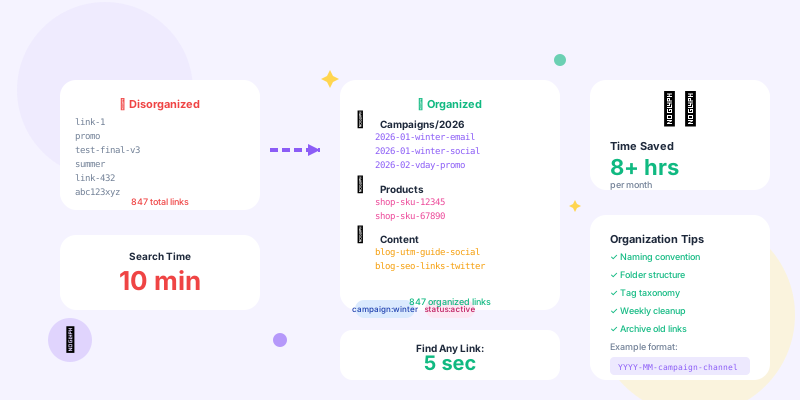
Most teams start organized. The first 10 links have perfect names, proper tags, and logical structure. But by link 100, discipline fades. By link 500, it's chaos. By link 1,000, finding anything takes forever.
Poor link organization wastes time, causes confusion, and leads to creating duplicate links (because finding the original is harder than making a new one). Proper link organization means finding any link in seconds, not minutes.
Why Link Organization Matters
The Cost of Disorganization
Scenario: Marketing team with 500 links Without organization:
Link names: "link-1", "promo", "summer", "test-2", "final", "final-v2"
Tags: Random or missing
Folders: None

Daily tasks:
• Find last month's email link: 8 minutes (scroll and guess)
• Find product link for SKU 12345: 12 minutes (check every link)
• Find all Black Friday links: 15 minutes (no way to filter)
• Share campaign links with teammate: 20 minutes (find each one individually)

Weekly time wasted: ~4 hours per person
Monthly cost: 16 hours × $50/hour = $800 per person
Annual cost (5-person team): $48,000 wasted
Link names: "2025-12-bf-email-vip-50off"
Tags: campaign, channel, audience, offer
Folders: /campaigns/2025/black-friday/

Daily tasks:
• Find last month's email link: 15 seconds (filter by date + "email")
• Find product link for SKU 12345: 10 seconds (search "SKU-12345")
• Find all Black Friday links: 5 seconds (open Black Friday folder)
• Share campaign links: 30 seconds (select folder, share all)

Weekly time saved: ~4 hours per person
Annual savings: $48,000 per team
Link Naming Conventions
The Anatomy of a Good Link Name
Bad link names:- "link1"
- "promo"
- "summer-sale"
- "test"
- "final-final-v2"
[DATE]-[CAMPAIGN]-[CHANNEL]-[AUDIENCE]-[OFFER]

Examples:
• 2026-01-winter-email-vip-25off
• 2026-01-winter-social-gen-freeship
• 2026-01-winter-ads-retarget-40off

Why this works:
✓ Date prefix → Sorts chronologically
✓ Campaign → Groups related links
✓ Channel → Know where it's used
✓ Audience → Know who sees it
✓ Offer → Remember what it promotes
✓ Unique → Never duplicate
✓ Readable → Instantly understand purpose
Naming Convention Templates by Use Case
1. Campaign links:
Format: [YEAR]-[MONTH]-[CAMPAIGN]-[CHANNEL]-[VARIANT]

Examples:
• 2026-01-newyear-email-header
• 2026-01-newyear-social-instagram
• 2026-01-newyear-ads-facebook-a
• 2026-01-newyear-ads-facebook-b

Benefits:
- All campaign links group together
- Easy to find all variants
- Clear A/B test organization
Format: shop-[SKU]-[CHANNEL]

Examples:
• shop-12345-email
• shop-12345-social
• shop-12345-ads
• shop-67890-affiliate

Benefits:
- Quickly find product links by SKU
- See all channels for one product
- Consistent across catalog
Format: blog-[SLUG]-[CHANNEL]

Examples:
• blog-link-organization-social
• blog-link-organization-email
• blog-utm-tracking-guide-twitter
• blog-utm-tracking-guide-linkedin

Benefits:
- Connect to original content easily
- Track which channels drive traffic
- Avoid duplicate content links
Format: [EVENT]-[YEAR]-[TYPE]-[AUDIENCE]

Examples:
• webinar-2026-reg-email
• webinar-2026-reg-social
• webinar-2026-replay-attendee
• webinar-2026-replay-noshow

Benefits:
- Group all event-related links
- Track registration vs. replay
- Segment by audience
- Use hyphens, not underscores: "summer-sale" not "summer_sale" (more readable)
- Lowercase only: "PROMO" and "promo" shouldn't be different links
- Abbreviate consistently: "fb" always means Facebook, "ig" always means Instagram
- Avoid special characters: No &, %, $, @ (causes encoding issues)
- Date format: YYYY-MM or YYYY-MM-DD (sorts correctly)
Folder Structure Strategies
Option 1: Folder by Campaign (Best for Marketing Teams)
📁 Campaigns
  📁 2026
    📁 Q1
      📁 Winter Sale (Jan)
        - 2026-01-winter-email-vip-25off
        - 2026-01-winter-social-ig-story
        - 2026-01-winter-ads-fb-carousel
      📁 Valentine's Day (Feb)
        - 2026-02-vday-email-early-access
        - 2026-02-vday-social-couples
      📁 Spring Launch (Mar)
    📁 Q2
    📁 Q3
    📁 Q4
  📁 2025 (archived)
📁 Evergreen
  - email-newsletter-weekly
  - social-product-spotlight
📁 Tests
  - test-landing-page-v1
  - test-landing-page-v2
- Campaign-focused marketing
- Seasonal businesses
- Time-bound promotions
Option 2: Folder by Channel (Best for Content Teams)
📁 Email
  📁 Newsletter
  📁 Promotional
  📁 Transactional
📁 Social Media
  📁 Instagram
  📁 Facebook
  📁 LinkedIn
  📁 Twitter
📁 Paid Ads
  📁 Google Ads
  📁 Facebook Ads
  📁 LinkedIn Ads
📁 Website
  📁 Blog
  📁 Landing Pages
  📁 Product Pages
- Multi-channel content distribution
- Different teams manage different channels
- Need channel-specific analytics
Option 3: Folder by Product/Service (Best for E-commerce)
📁 Products
  📁 Category A
    📁 Product 1
    📁 Product 2
  📁 Category B
📁 Collections
  📁 Summer Collection
  📁 Best Sellers
📁 Promotions
  📁 Site-Wide Sales
  📁 Category Sales
  📁 Product-Specific Deals
- Large product catalogs
- Product-based marketing
- E-commerce stores
Option 4: Folder by Team/Department (Best for Enterprises)
📁 Marketing
  📁 Demand Gen
  📁 Content
  📁 Events
📁 Sales
  📁 Outbound
  📁 Demo Links
  📁 Proposals
📁 Product
  📁 Release Notes
  📁 Feature Announcements
📁 Customer Success
  📁 Onboarding
  📁 Resources
- Large organizations with multiple teams
- Different teams need link access control
- Cross-functional campaigns
Tagging Strategies
Tag Categories
Use tags to add dimensions folders can't provide: 1. Campaign tags:
Tags: campaign:winter-sale, campaign:black-friday, campaign:product-launch

Usage: Filter all links from specific campaign across all channels/folders

Example:
Find all "winter-sale" links regardless of channel
→ Tag filter: campaign:winter-sale
→ Results: Email links, social links, ad links all together
Tags: channel:email, channel:social, channel:paid-ads, channel:organic

Usage: See performance across channels

Example:
Compare email vs. social performance across all campaigns
→ Tag filter: channel:email
→ Tag filter: channel:social
→ Compare analytics
Tags: audience:vip, audience:new-customer, audience:churned, audience:trial

Usage: Track which audiences respond best

Example:
Find all links targeting VIP customers
→ Tag filter: audience:vip
→ See which campaigns work best for VIPs
Tags: status:active, status:paused, status:expired, status:testing

Usage: Quickly filter by current state

Example:
Find all currently active links
→ Tag filter: status:active
→ Hide expired/paused links from view
Tags: performance:winner, performance:test, performance:underperforming

Usage: Track what's working

Example:
Find all winning variants from A/B tests
→ Tag filter: performance:winner
→ Learn from successful patterns
Tagging Best Practices
1. Use consistent tag prefixes:
Good:
- campaign:winter-sale
- channel:email
- audience:vip

Bad:
- winter-sale (what category is this?)
- email-campaign (mixed prefix)
- VIP-audience (inconsistent case)
Ideal: 3-5 tags
Maximum: 7 tags

Too few (<3): Not enough context
Too many (>7): Defeats purpose of organization
# Link Tagging Taxonomy

## Campaign Tags
- campaign:[name] - Campaign identifier
- Example: campaign:winter-sale, campaign:black-friday

## Channel Tags
- channel:[channel] - Distribution channel
- Options: email, social, paid-ads, organic, affiliate, partner

## Audience Tags
- audience:[segment] - Target audience
- Options: vip, new, churned, trial, enterprise, smb

## Status Tags
- status:[state] - Current link status
- Options: active, paused, expired, testing, archived
Search Strategies
Advanced Search Techniques
1. Search by date range:
Find all links created in December 2025:
→ Filter: created_date >= 2025-12-01 AND created_date <= 2025-12-31

Find links older than 1 year (candidates for archival):
→ Filter: created_date < 2025-01-01
Find underperforming links (< 10 clicks in 30 days):
→ Filter: clicks < 10 AND age > 30 days

Find top performers (> 1000 clicks):
→ Filter: clicks > 1000
→ Sort: clicks descending
Find all links to blog posts:
→ Search: destination contains "/blog/"

Find all product links:
→ Search: destination contains "/product/"

Find all expired landing pages (404):
→ Filter: status_code = 404
Find active email links from Q4 2025 campaigns with >500 clicks:
→ Tag: channel:email
→ Tag: status:active
→ Date: 2025-10-01 to 2025-12-31
→ Clicks: >500
Bulk Operations for Organization
Cleaning Up Existing Links
Scenario: You have 500 messy links that need organization Step 1: Export all links to CSV
Columns: id, slug, destination, created_date, clicks, tags, folder
- Add proper naming (use formulas to standardize)
- Add missing tags (bulk tag similar links)
- Assign to folders (categorize by pattern)
- Mark for archival (old, unused links)
import pandas as pd
import requests

# Load cleaned data
links = pd.read_csv('links_cleaned.csv')

# Bulk update
for index, link in links.iterrows():
    requests.patch(
        f'https://api.linkshortener.com/v1/links/{link["id"]}',
        json={
            'tags': link['tags'].split(','),
            'folder': link['folder']
        },
        headers={'Authorization': f'Bearer {API_KEY}'}
    )

print(f"Updated {len(links)} links")
Pick one weekend. Export all links. Spend 2-3 hours organizing in bulk. Use find/replace, formulas, and patterns to clean everything at once. Upload changes via API. Never waste time searching again.
Is it boring? Yes. Is it worth it? Absolutely. You'll save 8+ hours per month forever.
Team Collaboration & Access Control
Shared Link Organization
Problem: 5 people all creating links with different naming/organization Solution: Team guidelines 1. Create link creation template:
# Link Creation Checklist

Before creating any link:

☐ Check if link already exists (search destination URL)
☐ Use naming convention: [DATE]-[CAMPAIGN]-[CHANNEL]-[AUDIENCE]-[OFFER]
☐ Add required tags: campaign, channel, audience, status
☐ Assign to correct folder
☐ Add description (what is this link for?)
☐ Set expiration date (if applicable)

Example:
Slug: 2026-01-winter-email-vip-25off
Tags: campaign:winter-sale, channel:email, audience:vip, status:active
Folder: /campaigns/2026/q1/winter-sale/
Description: Winter sale email to VIP list, 25% off sitewide
/campaigns/ → Marketing Manager
/products/ → E-commerce Manager
/content/ → Content Manager
/sales/ → Sales Operations

Owner responsibilities:
- Maintain folder organization
- Archive old links
- Ensure team follows naming conventions
- Weekly cleanup/review
Permissions:
• Marketing team → Full access to /campaigns/
• Sales team → Full access to /sales/, read-only to /campaigns/
• Content team → Full access to /content/
• Everyone → Read-only to /evergreen/

Prevents:
- Accidental deletion by wrong team
- Unauthorized link modifications
- Cross-team confusion
Link Archival Strategy
When to Archive Links
Archive (don't delete) links when:- Campaign ended >90 days ago
- Link hasn't been clicked in 6+ months
- Product/content no longer exists
- Link was replaced by newer version
- Preserve analytics history
- Maintain attribution data
- Enable future analysis
- Avoid breaking old references
Option 1: Archive folder
Move to /archive/[year]/ folder

Option 2: Archive tag
Add status:archived tag

Option 3: Archive filter
Create saved filter: "Show only non-archived links"

Result:
Links hidden from daily view but still accessible when needed
Organization Maintenance
Weekly Link Hygiene (15 minutes)
Monday morning routine:

1. Review last week's new links (5 min)
   → Check naming conventions followed
   → Verify proper tagging
   → Move to correct folders if misplaced

2. Archive completed campaigns (3 min)
   → Find campaigns that ended
   → Move to archive folder
   → Update status tags

3. Check for duplicates (3 min)
   → Search for similar destination URLs
   → Merge or delete duplicates
   → Update references if needed

4. Update documentation (4 min)
   → Note any new patterns/campaigns
   → Update tagging taxonomy if needed
   → Share organization updates with team
Monthly Link Audit (30 minutes)
First Friday of each month:

1. Review folder structure (10 min)
   → Are folders too deep? Too flat?
   → Do folders make sense still?
   → Archive old campaign folders

2. Analyze tag usage (10 min)
   → Which tags are most useful?
   → Which tags are never used? (delete them)
   → Are new tag categories needed?

3. Check link health (10 min)
   → Find broken links (404s)
   → Update expired links
   → Fix/redirect or archive broken links
Link Organization Tools
Must-Have Features
1. Bulk editing:- Select 50 links → Add tag to all
- Select folder → Move all to new location
- Select campaign → Update all destinations
- Multiple tag filters (AND/OR)
- Date range filters
- Performance filters (clicks, conversions)
- Destination URL search
- Drag-and-drop organization
- Nested folders (up to 5 levels)
- Folder-level permissions
- Save common filter combinations
- Quick access to frequent searches
- Share views with team
- Export to CSV for analysis
- Bulk import from spreadsheet
- API access for automation
Conclusion
Link organization isn't about being perfect—it's about being able to find what you need when you need it. You don't need a PhD in taxonomy. You need: 1. Consistent naming conventions 2. Logical folder structure 3. Useful tags4. Regular maintenance (15 min/week)
The difference between organized and disorganized link management isn't just aesthetics—it's 8+ hours per month saved, campaigns launched faster, and zero time wasted searching for "that link from last month."
Your action plan: This week:- Document your naming convention (write it down, share with team)
- Create folder structure (start simple, 3-5 top-level folders)
- Define 3-5 tag categories (campaign, channel, status at minimum)
- Do one-time cleanup of existing links (export, clean, re-import)
- Train team on new organization system
- Implement weekly link hygiene routine
- Review organization effectiveness (is it working?)
- Adjust structure based on usage patterns
- Automate organization with API (auto-tag, auto-folder based on patterns)
Stop wasting 20 minutes searching for links. Start finding any link in 5 seconds.
Your future self will thank you.